Chart view · NQ-PERP
If you trade on Vest, you’d love Vest Flow. Keep it open beside your trading chart and watch how the gap changes.
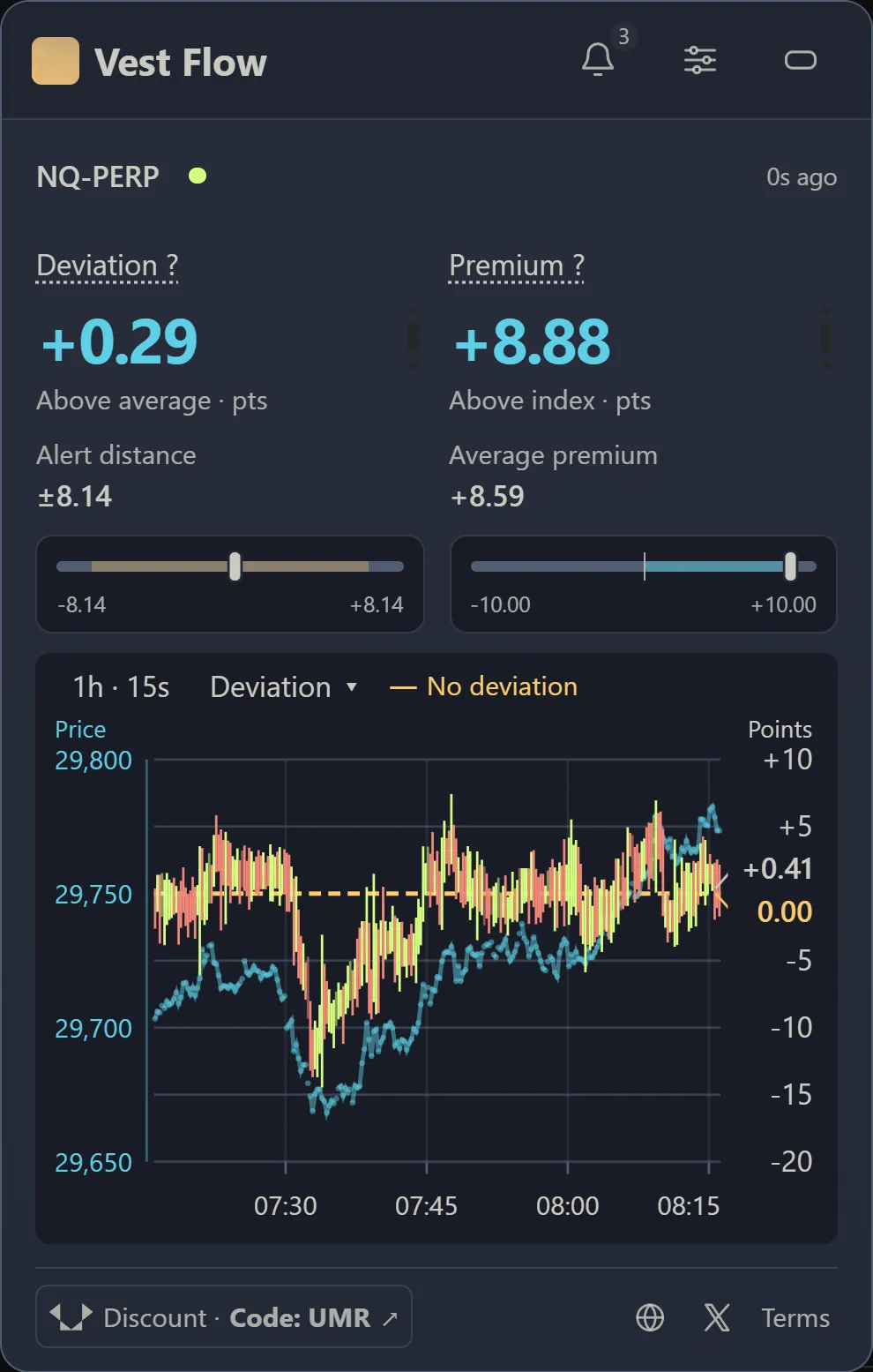
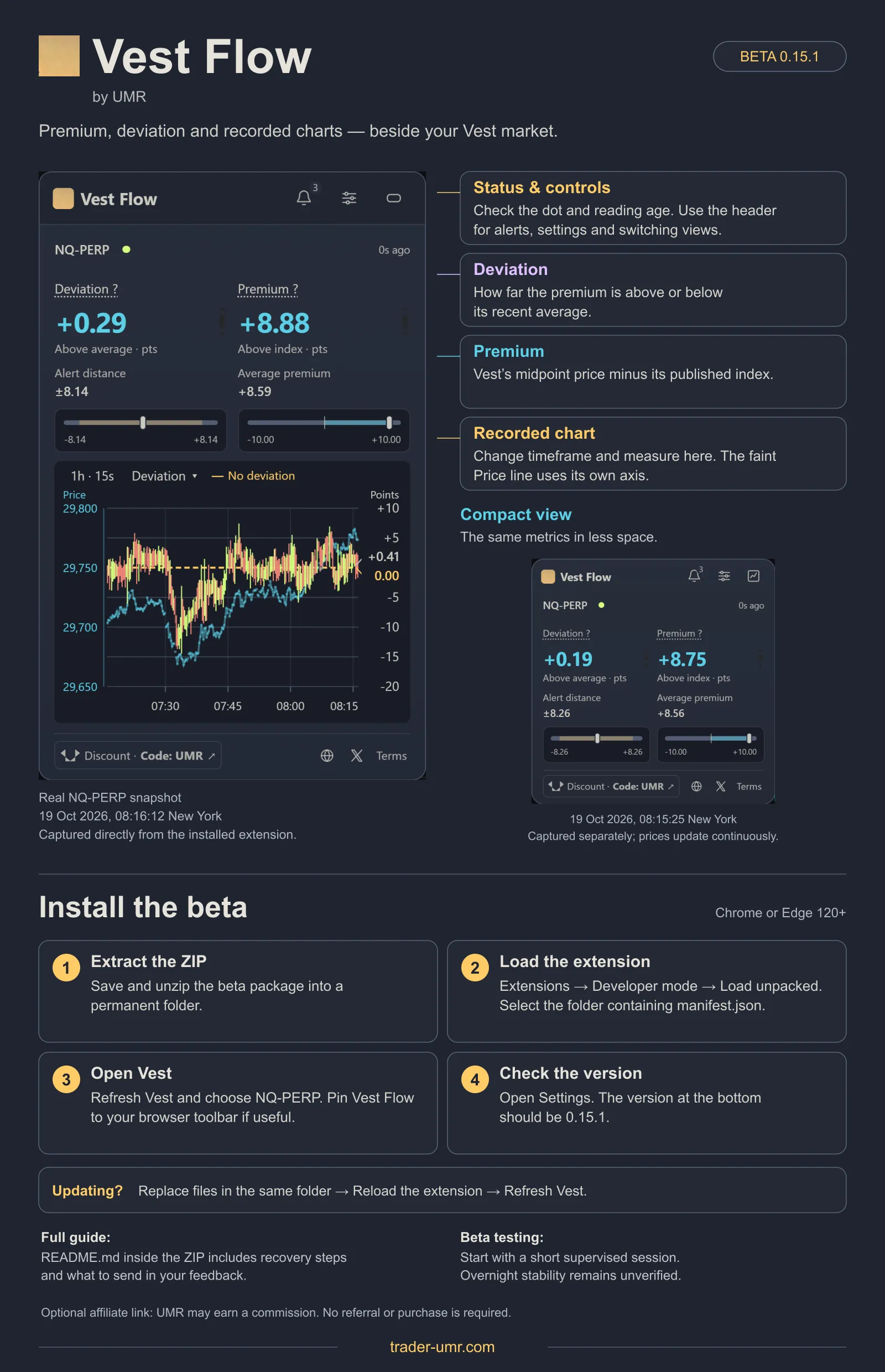
- PremiumThe gap now: Vest’s midpoint, halfway between bid and ask, minus its index. Here, +8.88 means NQ-PERP is 8.88 points above its index (which closely tracks NQ futures in my experience).
- DeviationHow far the premium is from its recent weighted average. Here, +0.29 means it’s 0.29 points above its +8.59 average. For NQ-PERP, I recommend starting with deviations of 12 points or more in either direction (−12 or lower, +12 or higher).
- Deviation candlesSee when the gap stretches or settles back. The yellow zero line marks the recent average; the right axis measures deviation in points.
- Price lineFollow price alongside the gap. The blue line uses the price scale on the left.
- Automatic alert distanceCalculated automatically from this market’s recent premium variability and your alert settings. The ±8.14 shown here is the extension’s alert threshold; my 12-point NQ starting recommendation is separate.
- Alert historyClick the bell to open recent alert history and review previous alerts.
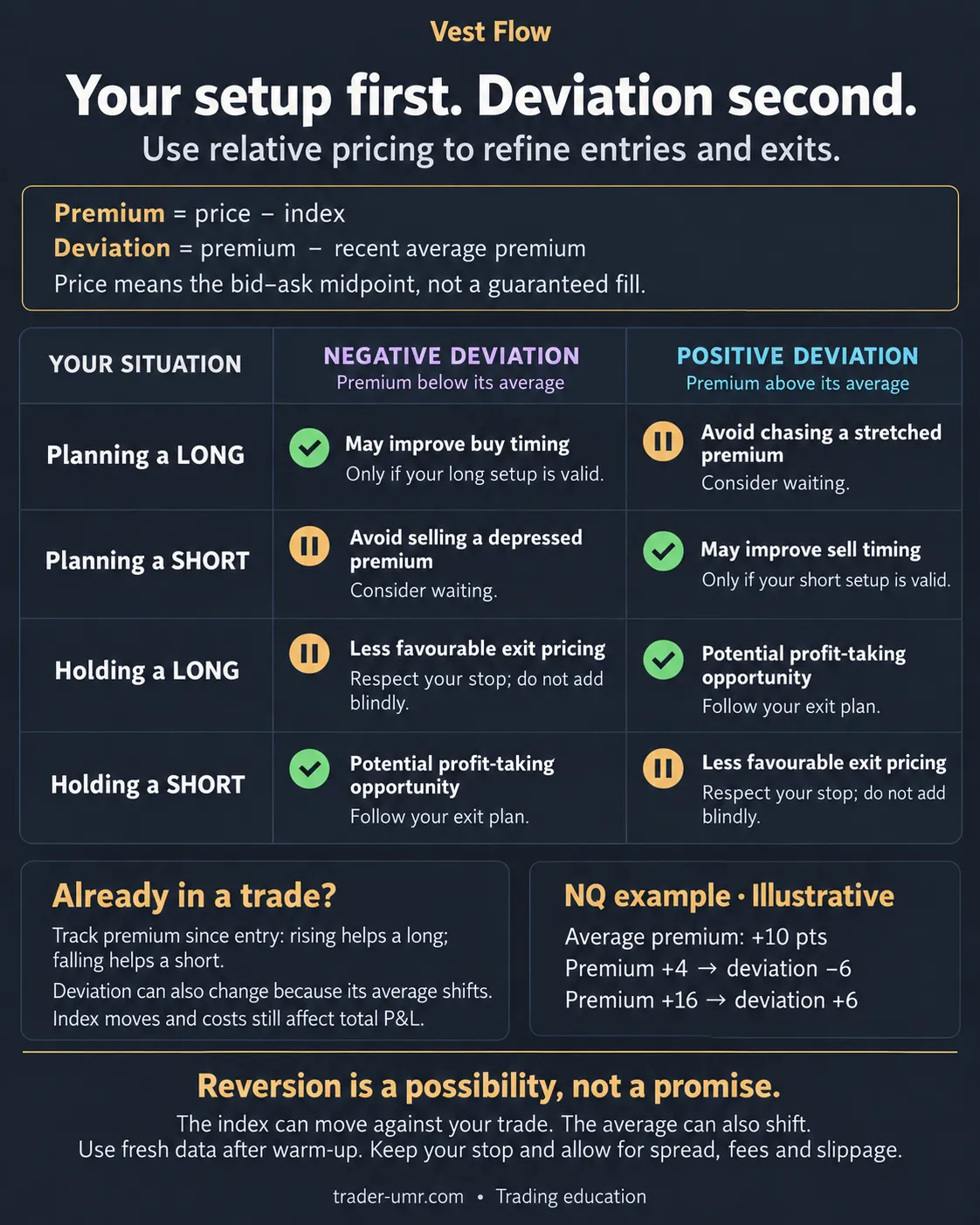
A positive premium can still be below usual. Suppose the average premium is +10 and the current premium is +4:
+4 − +10 = −6 points of deviation
Vest is above its index, but the gap is smaller than usual. That tells me about relative pricing; it doesn’t tell me which way NQ will go.
The captures show the extension as it was on 19 October. Chart and headline readings refresh at different rates, so their latest values can differ slightly.
How I use it in a trade
For me, there’s an edge in seeing when I’m paying an unusually high premium to buy, or selling at an unusually low one. I check the gap before entering and keep watching it while I’m in the trade.
| My situation | Below recent average | Above recent average |
|---|---|---|
| Planning a long | A more attractive relative price to buy. | I’d check whether I’m chasing the premium. |
| Planning a short | I’d check whether I’m selling a depressed premium. | A more attractive relative price to sell. |
| Holding a long | I stick to my stop and exit plan; a low reading alone isn’t a reason to add. | I’d consider this when taking planned profits. |
| Holding a short | I’d consider this when taking planned profits. | I stick to my stop and exit plan; a high reading alone isn’t a reason to add. |
| Scaling into a planned position | May favour a planned long add, within my original size and risk limits. | May favour a planned short add, within my original size and risk limits. |
| Taking partial profits | May suit buying back part of a short at a planned target. | May suit selling part of a long at a planned target. |
| Reading delayed or warming up | I wait for fresh data and a completed warm-up before using deviation for an entry. I keep managing existing positions under my risk plan. | |
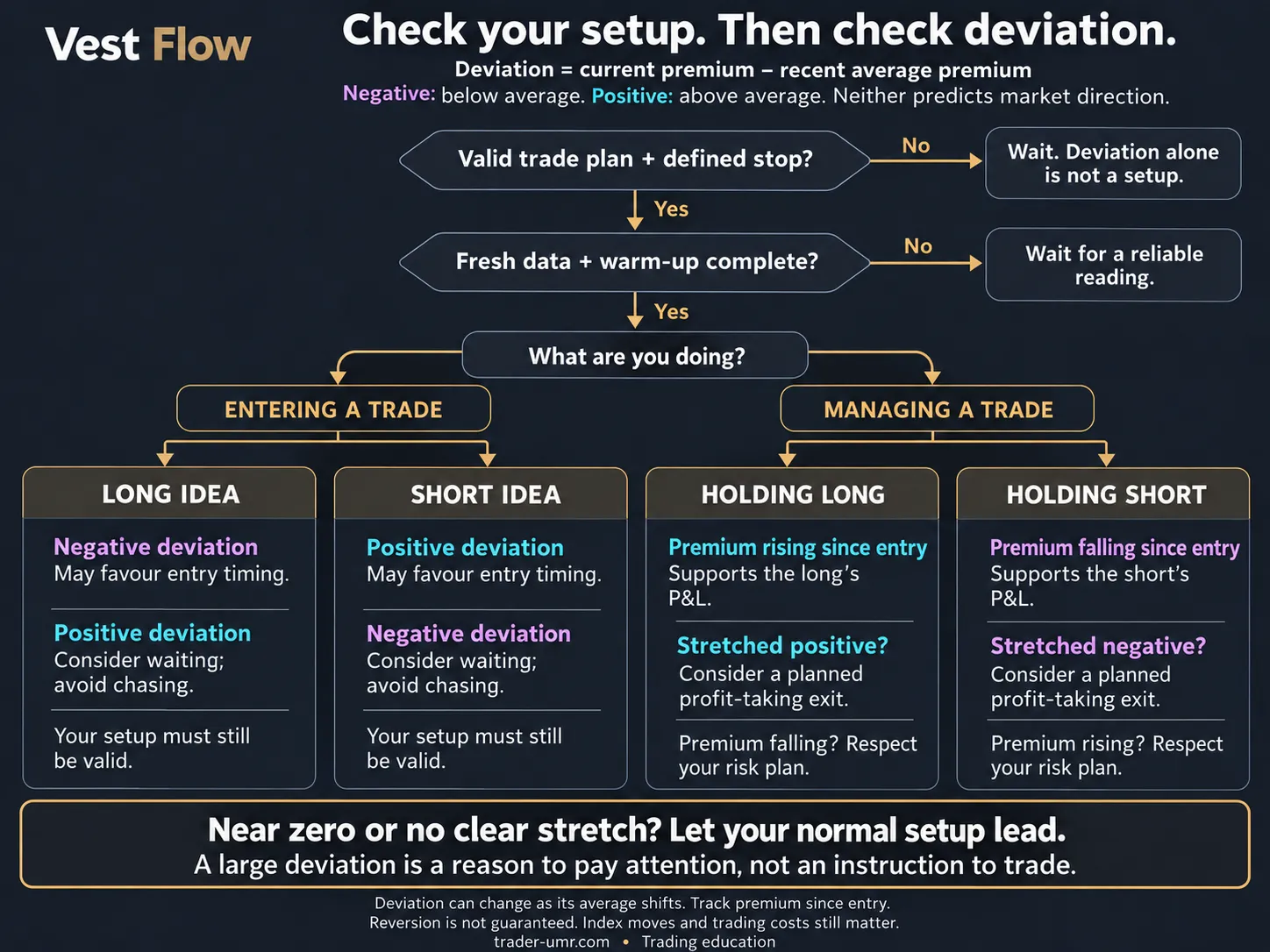
Once I’m in, I also compare the premium with where it was at entry. All else equal, a rise helps a long and a fall helps a short. The index move and the prices I get filled at still matter.
Entry and exit reference guides
I haven’t measured a standalone return from these readings. I still check executable prices, spread, fees and slippage, and follow my setup and stop. Deviation can change as its average shifts; the premium may stay stretched.
For execution mechanics, see Vest’s order documentation.
Why I use the index as the comparison price
I first compared Vest’s NQ-PERP price with NQ futures prices from my Sierra Chart Denali connection. The futures feed was a price benchmark for the tool; the trades I was assessing were on Vest.
I couldn’t share that data setup in this form. In my experience, Vest’s NQ index tracks NQ futures very closely, so I switched the comparison to Vest’s published index. You get that view of the gap without setting up Sierra Chart or Denali.
Vest Flow compares each Vest instrument with its own published index. It doesn’t connect to a CME futures feed, and the NQ index and NQ futures can still differ.
Make room for the way you trade
Compact view · NQ-PERP
Keep the two readings nearby in a smaller panel, with more room for your trading chart.
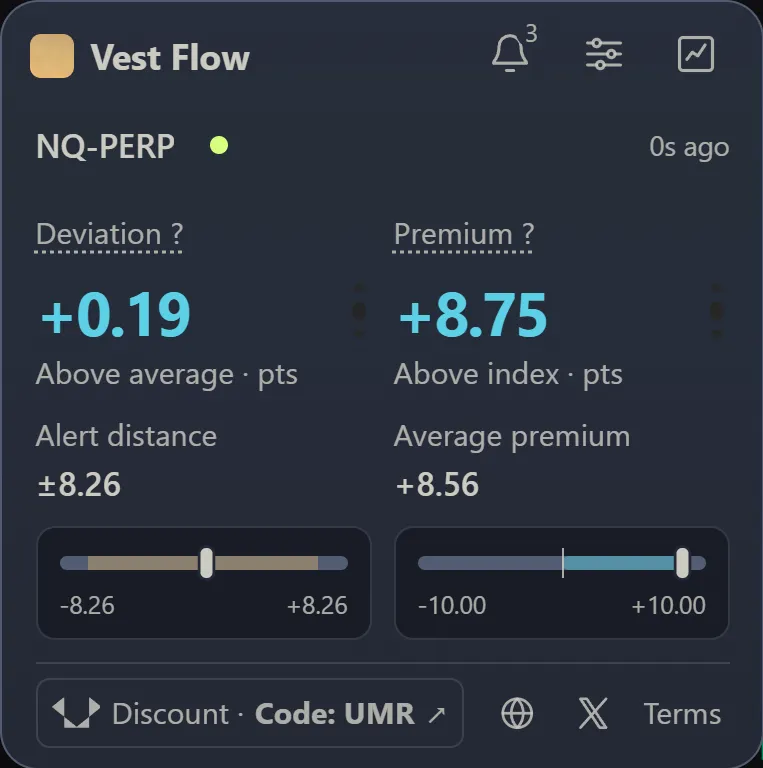
- Switch viewsReopen the chart with this button. You can drag either panel out of the way.
- Reading ageCheck the age and status dot before relying on a reading.
Chart controls, alerts and recorded history
- Your chart: choose the history range, bar size and measure. Change the panel’s theme to suit your workspace.
- Your alerts: choose Sensitive, Balanced or Selective, set a hold time, and turn on desktop notifications or sound. The alert distance adjusts automatically to recent premium variability and your settings. Click the bell to review recent alert history.
- Your history: keep up to three days of observations recorded while monitoring is active, with five-second detail for the latest hour.
Switch instruments in your Vest tab. Each market keeps separate rules, history and pause state; theme and notification preferences apply across markets.
Which markets? Vest Flow works across all Vest instruments. NQ-PERP is the example in this guide; each market is compared with its own published index.
Get Vest Flow beside your chart
Download the free beta for Chrome or Edge 120+ and follow the four steps below. I built it to give you a clearer view of the price you’re trading.
Version 0.15.1 · 309 KB · Manual installation
Vest Flow reads public market data. It doesn’t need your account credentials or permission to place trades.
- Extract the ZIP into a permanent folder and keep its files together.
- Open
chrome://extensionsoredge://extensionsin your browser and enable Developer mode. - Choose Load unpacked and select the extracted folder containing
manifest.json. - Refresh Vest, choose your instrument and open the panel’s Settings. Check that the version at the bottom is 0.15.1.
For updates, follow me on Twitter (@trader_umr) ↗. I’d love to hear how you get on.
Your first session
Leave a Vest market tab open and allow about 10 minutes of fresh observations for alerts to learn the average under the default rules. Your chart builds as it records; it won’t backfill the time before you started.
A background tab can keep recording and alerting. Closing the last market tab stops monitoring after a short grace period. Browser closure, sleep or connection loss leaves a gap in the record.
Installation guide, updates and troubleshooting
To update, replace the files in the same folder, reload the extension on its Extensions card, then refresh your Vest tabs. Keep the same installation to retain local history; uninstalling removes it. A worker restart or rule change starts alert learning again.
The ZIP includes a README with recovery steps. For bug reports, send your browser and extension versions, instrument, chart settings and what happened. Mention sleep or connection interruptions and remove account details from screenshots.
Permissions and privacy
Your settings and recorded history stay in your browser. Vest Flow doesn’t place orders or send telemetry to me. Public API requests and external links share normal connection metadata with their destinations.
I may earn a commission if you use my Vest link or code UMR. A referral or purchase is not required to use Vest Flow.
I’m working towards a Chrome Web Store release if people find Vest Flow useful. For now, you can install the beta from the ZIP above.